Unlock your PC with your face

Facial recognition is something we've all seen in movies, used to grant access to secret labs, high-tech computing systems or locked safe boxes.

Now you can also use it to keep your PC secure while you're away from it.

Despite its cartoonish name, BananaScreen is an efficient tool that will protect your computer from unauthorized access in a very easy way.

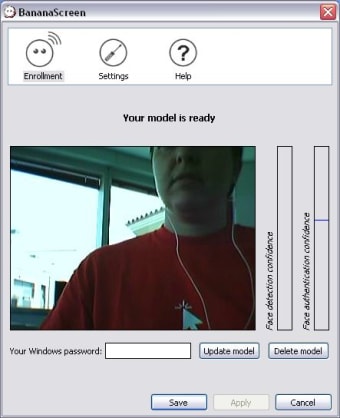
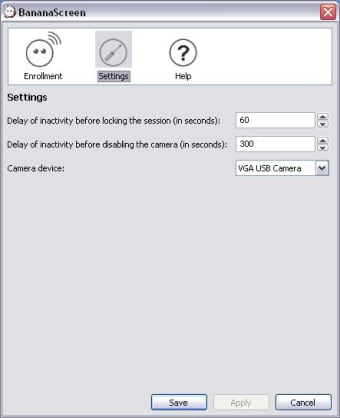
Simply install it, plug your webcam, record your own face and you're done. The program will lock the PC after the lapse of time you set in configuration options and immediately unlock it only if the same face that was recorded before sits in front of the computer.

BananaScreen did a good job during our tests, recognizing our face on every occasion and blocking other users. There's also the option to enter your own Windows password in case it doesn't work.

However, and since it's still a beta version, we have doubts about its reliability. In fact, we've read comments from users who were able to fool the program by using a picture of the computer's owner.


  • Pros

    • Very fast locking and unlocking system
  • Cons

    • May not be as reliable as a good, strong password
 0/2

App specs

  • License

    Free

  • Version

    1.2.1

  • Latest update

  • Platform

    Windows

  • OS

    Windows XP

  • Language

    English

  • Downloads

    102K

    Last month's downloads

    • 17
  • Size

    1.88 MB

  • Developer

Program available in other languages


User reviews about BananaScreen

3.1

3 reviews

Add review

Main reviews for you

  • Anonymous user

    Good Software for personal use. This software works pretty well for personal use. I have tested it in various ways including photos, other people, me, ect. It has worked correctly in all of my "tests". but I found three major glitches that can be done by anybody who has a criminal mind or knows a little about computers or looks like you.first: anyone can take a photo of you and access your computer with itsecond: Ctrl Alt Delete still works on PCs so the app can be closedthird: if you have a twin they can access the computerThis software works great when I use it to prevent my 15 year old sister from using it, because she won't even attempt to hack it. plus it is lots of fun to use.

  • Anonymous user

    WORST SECURITY EVER. It doesn't secure a thing. Though it asks you to set your own face that doesn't mean anything. It simply unlocks whenever it sees any face, or anything resembling a face...or things that are somewhat round... Pros: Looks kinda cool Cons: absolutely zero security, any person who came to my computer was able to log in, I held a picture of a random person on my phone to the camera and that worked, I held up a bottle of axe and somehow even that worked...

  • Anonymous user

    Abdel Naser Ahmad. thanks for the programe but i am using os vista ultemate i found it dosn't work.thaks

More

You may also like

Alternatives to BananaScreen

Explore Apps

Latest articles

Laws concerning the use of this software vary from country to country. We do not encourage or condone the use of this program if it is in violation of these laws.
Softonic

Is BananaScreen safe?

100/100

Score result: Clean

This file passed a comprehensive security scan using VirusTotal technology. It is safe to download.

  • Virus free
  • Spyware free
  • Malware free
  • Verified by Security Partners

    VirusTotal logo

Scan Info

Last scan
Wednesday, November 8, 2023
Scan provider
VirusTotal · Full report

File Integrity

File
BananaScreen_1.2.1.msi
SHA256
2ca66d2a5ae6c8bcb714bc4b6eea63be2923aef3f80185372ecc49896e907a50
SHA1
09b96e8cb1b6740e52fbb2897ecd5e2a20eaefd4

Softonic security commitment

BananaScreen has been thoroughly scanned by our advanced security systems and verified by industry-leading partners. This file comes from the official developer and has passed all our security checks, showing no signs of viruses, malware, or spyware. For more information, visit our Security and Trust Center